

Have you ever been curious about how photo editing apps manage to detect the location in the photo where the picture was taken while on vacation, as well as what camera settings were used? The answer to this question lies in the hidden information contained within the photo. This tutorial will examine How to Read EXIF and Metadata from Images Using JavaScript.
Web developers may require parsing image data using JavaScript to create smarter apps. Whether you want to sort uploaded images based on their dates of upload, show features of an uploaded photo’s camera, or show the location of an uploaded photo, parsing this data is necessary. This tutorial will walk you through the concepts to provide a simple solution for parsing this data.
Understanding Image Metadata
An image file is like a package of noodles. The photo resembles the noodles, while the metadata represents the package’s label. You can’t identify a label just by examining the contents. For instance, a label contains all the ingredients used in a particular package.
Likewise, image metadata is stored within the file system itself. It contains information about an image but does not affect the image itself. It assists the operating system with the effective management of files.
What is EXIF Data?
EXIF stands for Exchangeable Image File Format. When you click a photo with a digital camera or a smartphone, the device instantly records technical details. This specific set of data acts as a digital fingerprint for your photograph.
You can find a wealth of information in EXIF data, such as:
- Camera make and model
- Date and time of the capture
- Shutter speed and Aperture
- ISO levels
- GPS coordinates
Why to Use Image Metadata It?
Real-life applications rely heavily on this data. A travel blog might use the GPS coordinates from your upload to pin the exact location on a world map automatically. Professional photography sites use JavaScript get EXIF data from photo scripts to display the lens and camera settings.
How to Read Image File Metadata in JavaScript
Now let us look at the practical side. We will create a simple tool to select an image and display its hidden data. We will use a popular lightweight library called exif-js to handle the heavy lifting, as parsing raw binary data can get complex. It helps other users understand how someone achieved a specific shot.
We use a clean interface where users can upload an image. The application then displays the metadata in a neat table format. We import the exif-js library directly from a CDN to handle the data parsing.
<!DOCTYPE html>
<html lang="en">
<head>
    <meta charset="UTF-8">
    <meta name="viewport" content="width=device-width, initial-scale=1.0">
    <title>Read Image EXIF Data with GPS</title>
    <link href="https://cdn.jsdelivr.net/npm/bootstrap@5.3.0/dist/css/bootstrap.min.css" rel="stylesheet">
    <style>
        body {
            background-color: #f8f9fa;
        }
        .upload-area {
            background: #ffffff;
            border-radius: 10px;
            box-shadow: 0 4px 6px rgba(0,0,0,0.1);
        }
        .table th {
            width: 35%;
            color: #495057;
        }
    </style>
</head>
<body>

<div class="container mt-5">
    <div class="row justify-content-center">
        <div class="col-md-8">
            <div class="text-center mb-4">
                <h1 class="display-6">Advanced Metadata Reader</h1>
                <p class="text-muted">Extract EXIF, GPS, and Copyright details</p>
            </div>

            <div class="upload-area p-5 mb-4 text-center">
                <div class="mb-3">
                    <input class="form-control form-control-lg" type="file" id="fileInput" accept="image/jpeg, image/png">
                </div>
            </div>

            <div id="resultCard" class="card d-none">
                <div class="card-header bg-success text-white">
                    Image Analysis Result
                </div>
                <div class="card-body">
                    <div class="row">
                        <div class="col-md-4 text-center mb-3">
                            <img id="imagePreview" src="" alt="Preview" class="img-fluid rounded border shadow-sm">
                        </div>
                        <div class="col-md-8">
                            <table class="table table-bordered table-hover">
                                <tbody>
                                    <tr>
                                        <th>Make & Model</th>
                                        <td id="cameraInfo">-</td>
                                    </tr>
                                    <tr>
                                        <th>Date Taken</th>
                                        <td id="dateTaken">-</td>
                                    </tr>
                                    <tr>
                                        <th>Exposure</th>
                                        <td id="exposureInfo">-</td>
                                    </tr>
                                    <tr>
                                        <th>ISO Speed</th>
                                        <td id="iso">-</td>
                                    </tr>
                                    <tr>
                                        <th>GPS Latitude</th>
                                        <td id="gpsLat">-</td>
                                    </tr>
                                    <tr>
                                        <th>GPS Longitude</th>
                                        <td id="gpsLong">-</td>
                                    </tr>
                                    <tr>
                                        <th>Copyright / Artist</th>
                                        <td id="copyright">-</td>
                                    </tr>
                                </tbody>
                            </table>
                        </div>
                    </div>
                </div>
            </div>
        </div>
    </div>
</div>

<script src="https://cdn.jsdelivr.net/npm/exif-js"></script>
<script>
    document.getElementById('fileInput').addEventListener('change', function(e) {
        var file = e.target.files[0];
        var resultCard = document.getElementById('resultCard');
        var preview = document.getElementById('imagePreview');

        if(file && file.type.match('image.*')) {
            var reader = new FileReader();

            reader.onload = function(event) {
                preview.src = event.target.result;
                resultCard.classList.remove('d-none');
            };

            reader.readAsDataURL(file);

            EXIF.getData(file, function() {
                var make = EXIF.getTag(this, "Make");
                var model = EXIF.getTag(this, "Model");
                var date = EXIF.getTag(this, "DateTime");
                var shutter = EXIF.getTag(this, "ExposureTime");
                var fnumber = EXIF.getTag(this, "FNumber");
                var iso = EXIF.getTag(this, "ISOSpeedRatings");
                var artist = EXIF.getTag(this, "Artist");
                var copy = EXIF.getTag(this, "Copyright");

                var lat = EXIF.getTag(this, "GPSLatitude");
                var latRef = EXIF.getTag(this, "GPSLatitudeRef");
                var lon = EXIF.getTag(this, "GPSLongitude");
                var lonRef = EXIF.getTag(this, "GPSLongitudeRef");

                var camString = (make || "") + " " + (model || "");
                document.getElementById('cameraInfo').innerText = camString.trim() ? camString : "N/A";

                document.getElementById('dateTaken').innerText = date ? date : "N/A";

                var expString = (shutter ? "1/" + Math.round(1/shutter) + "s" : "") + (fnumber ? " @ f/" + fnumber : "");
                document.getElementById('exposureInfo').innerText = expString ? expString : "N/A";

                document.getElementById('iso').innerText = iso ? iso : "N/A";

                var finalLat = lat ? lat[0] + "° " + lat[1] + "' " + lat[2] + '" ' + (latRef || "") : "N/A";
                var finalLon = lon ? lon[0] + "° " + lon[1] + "' " + lon[2] + '" ' + (lonRef || "") : "N/A";

                document.getElementById('gpsLat').innerText = finalLat;
                document.getElementById('gpsLong').innerText = finalLon;

                document.getElementById('copyright').innerText = copy ? copy : (artist ? artist : "N/A");
            });
        }
    });
</script>

</body>
</html>
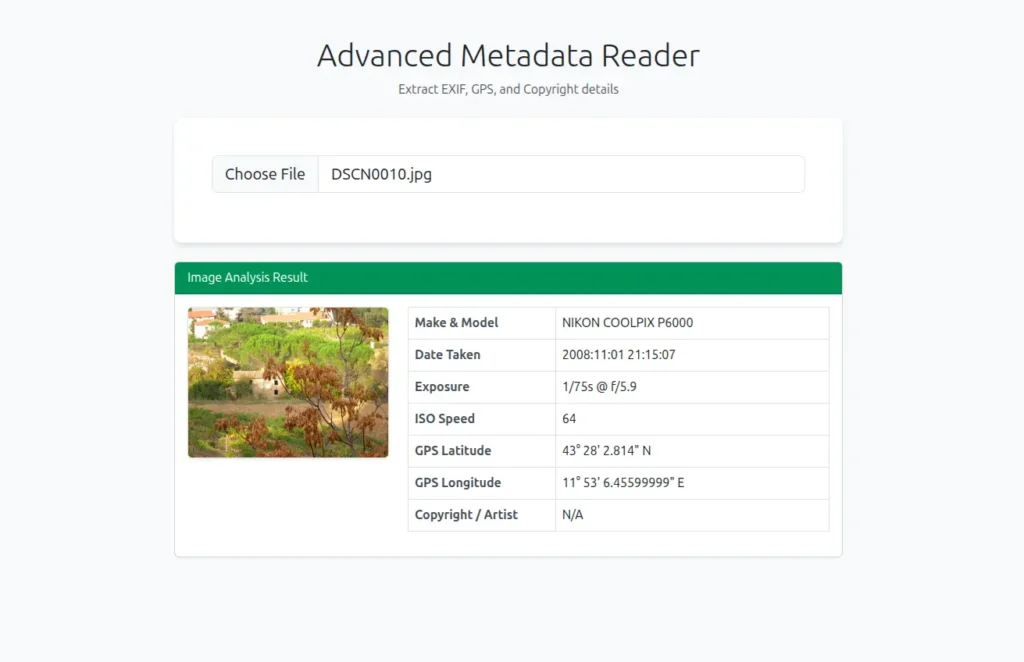
This complete example links the logic to a real-world interface that is compatible with all devices and has a polished appearance. We quickly arrange the layout using Bootstrap styles, producing a tidy container for the outcomes. The code uses a file reader to show a thumbnail preview of the uploaded image prior to processing the data, providing the user with instant visual confirmation that their file is prepared.
The script starts the extraction process to extract the necessary information after the file is chosen. By adding the hidden data into rows, it dynamically populates the table. Additionally, we incorporated intelligent handling for missing data; in the event that an image is missing certain details, such as GPS coordinates or ISO settings, the display gracefully displays “N/A” rather than a blank space or an error.
Output:
Conclusion
The process of gaining information about hidden image details definitely increases the overall experience. You now have the ability to create a simple reader that is capable of extracting information about image details via JavaScript. This function opens a wide range of possibilities for you in web development, including, but not limited to, deploying a date-formatted gallery and presenting technical information about photography. Just remember to explore your own hidden image details.